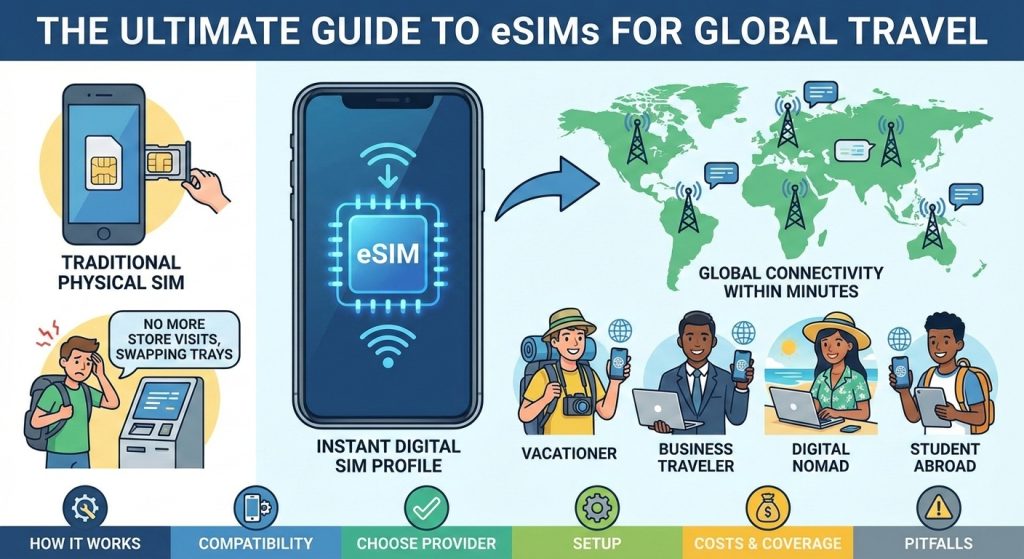
An eSIM (embedded SIM) is a digital SIM profile you download to a compatible phone, letting you activate mobile service without a physical card. For travel, eSIMs provide local data in your destination within minutes, ideal for international vacationers, business travelers, digital nomads, and students abroad. This article explains how eSIMs work, device compatibility, how to choose a provider and plan, setup steps, costs, coverage, and common pitfalls. Travelers choose eSIMs over physical SIMs or carrier roaming because they’re instant and hassle‑free: no store visits, no swapping trays, and you can keep your home number active while adding a local data plan. eSIMs typically offer better rates than roaming, flexible short‑term plans, multiple profiles, and easy switching across regions worldwide.
2) core concepts (eUICC, profiles, provisioning) #
- An eSIM lives on an eUICC, a tamper‑resistant chip inside your phone that can store multiple operator “profiles.” Each profile is a digital SIM containing credentials and parameters (such as IMSI for subscriber identity, Ki, APN settings) and is uniquely labeled by an ICCID. The eUICC itself is identified by an EID, a long hardware identifier used to target provisioning to a specific device.
- GSMA Remote SIM Provisioning (RSP) enables secure, over‑the‑air delivery and lifecycle management of profiles. Two server roles underpin RSP: SM‑DP+ (Subscription Manager Data Preparation), which hosts and encrypts profiles, binds them to an EID, and prepares them for download; and SM‑SR (Secure Routing), which maintains a secure channel to the eUICC, orchestrating install, enable, disable, and delete operations. On the device, a Local Profile Assistant coordinates these steps.
- Provisioning flows include scanning a QR code that encodes the SM‑DP+ address plus an activation code; entering an activation code manually; or downloading directly via a carrier or eSIM marketplace app that requests a profile from the SM‑DP+ and pushes it to your eUICC. Many carriers also support “push” activation initiated from account portals or phone settings, requiring only your EID and confirmation.
3) device compatibility and requirements #
- Use an unlocked, eSIM-capable phone. A carrier-locked device cannot add non-home eSIM profiles. Compatibility depends on model and region: many recent iPhones and flagship Androids support eSIM, but some regional variants lack it (e.g., certain Mainland China models) or are eSIM‑only (some US iPhones). Confirm band support for your destination.
- Most phones are dual SIM via DSDS: two lines active for standby/data, but a single radio handles voice, so calls on one line may pause data on the other. DSDA (two radios) is rare. VoLTE is essential in countries that retired 3G; if your travel eSIM or device isn’t VoLTE‑approved, voice may fall back to apps over data. Wi‑Fi Calling depends on carrier provisioning and is disabled on travel eSIMs.
- OEM/carrier whitelists can block activation for unsupported models. Keep firmware updated; APNs usually auto‑install, but manual entry may be needed.
4) coverage, networks, and technologies #
- Local vs regional vs global eSIM profiles; partner carriers (MNO/MVNO)
- Network tech: LTE, 5G NR, NSA/SA, VoLTE, 3G sunset implications
- Band support, roaming agreements, and throttling/fair use policies
5) plan types and pricing models #
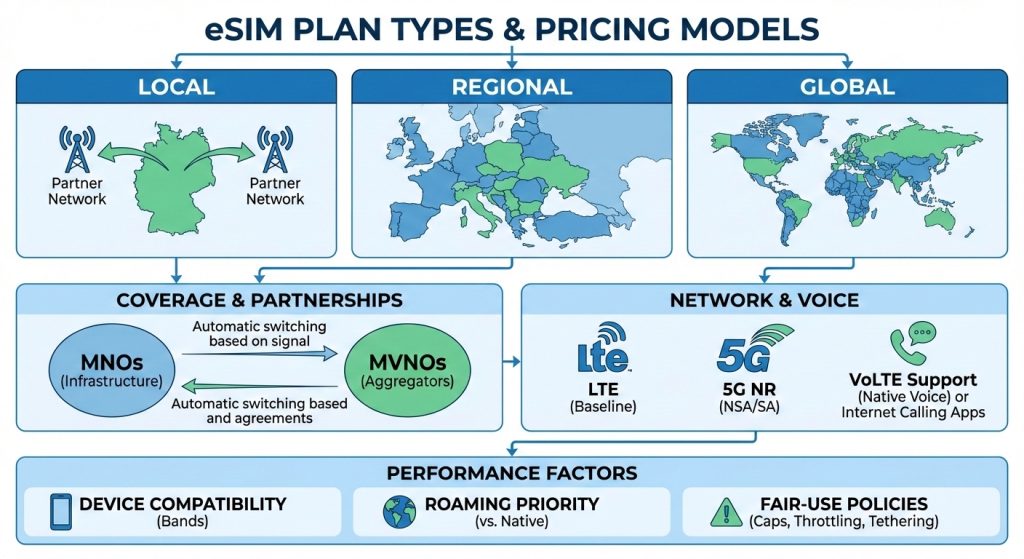
- eSIM coverage comes in three flavors: local profiles tied to one country and specific partner networks; regional bundles spanning multiple neighboring countries; and global plans that roam across dozens of markets. Providers partner with MNOs (infrastructure carriers) or operate as MVNOs aggregating multiple networks, switching automatically based on signal and agreements.
- Most travel eSIMs deliver LTE as the baseline; 5G NR is increasingly offered but often in NSA mode, with SA limited to select networks. VoLTE support matters because many countries have retired 3G; if your plan lacks native voice, use internet calling apps over data.
- Performance depends on device band compatibility and partner networks. Check your phone supports key LTE bands (e.g., 1/3/7/20/28) and common 5G bands (e.g., n77/n78/n41) used at your destination. Global/regional plans rely on roaming agreements, which can mean lower priority versus native subscribers. Fair‑use policies may cap high‑speed data, apply speed throttling, or restrict tethering after thresholds.
6) setup steps before and during trip #
- Pre‑trip checklist: confirm your phone is unlocked (check with your carrier) and supports eSIM. Update iOS/Android and accept any carrier settings updates. Install your eSIM provider’s app, create an account, and add a payment method that works abroad (3D Secure enabled); save the QR/activation details offline. Note your EID (Settings > About) in case support needs it.
- Activation (on Wi‑Fi): iOS—Settings > Cellular/Mobile Data > Add eSIM; scan the QR or choose Enter Details to input the SM‑DP+ server address and activation code. Android—Settings > Network & Internet > SIMs > Download a SIM (wording varies); scan or manually enter the SM‑DP+ and code. Wait for download/install; name the line.
- APN/config: most profiles auto‑install APNs; if data doesn’t work, enter the APN from the provider and reboot.
- Roaming/data: enable Data Roaming for the travel eSIM; disable roaming on your home SIM to avoid charges. Choose the travel eSIM for Cellular Data; keep voice/SMS on home if needed.
- Test before departure: verify data, messaging apps, and VoLTE/Wi‑Fi Calling (if offered). Many plans start on first use—download early, activate at destination.
7) numbers, calls, SMS, and messaging app behavior #
- Most travel eSIMs are data-only—no cellular number, voice, or SMS. Some offer add-on voice/SMS with a local DID; inbound works when attached; availability varies.
- Keep your home SIM active if you need your usual number: you can receive calls/SMS via roaming (charges) or, if your carrier allows, via Wi‑Fi Calling.
- OTP texts (bank/2FA) go to your home number; a data‑only eSIM won’t receive them unless your home line can attach.
- VoIP/OTT apps (WhatsApp, Telegram, Signal) work fine over data. WhatsApp remains tied to your registered number; you won’t “lose” it by using a travel eSIM. iMessage/FaceTime can send/receive via your phone number or Apple ID/email; using email avoids SMS verification abroad.
- Caller ID: cellular calls use the active SIM’s number; app calls show the app identity or any assigned DID.
8) dual SIM management and switching #
- Modern phones support Dual SIM Dual Standby. Clearly label your lines (Home, Travel) during setup. Set defaults: choose which SIM handles mobile data, which handles calls and SMS; keep home for calls/SMS if you need your number, and set travel as the data line. Enable data roaming only on the travel line; disable it on home. Turn off data switching to prevent fallback.
- Switching: you can store multiple eSIM profiles but only some can be active at once; turn lines on or off as needed. For coverage issues, change the default data line or enable a different eSIM profile. Priority follows the selected data SIM; in dual-standby, both lines can receive calls, but only one uses data at a time.
9) security, privacy, and safety #
- eSIM travel profiles use GSMA Remote SIM Provisioning: encrypted TLS delivery from the SM‑DP+ server to your phone’s secure element, with operator‑signed profiles and tamper‑resistant storage. Unlike physical SIM swapping, eSIM “swaps” require access to your provider account/QR/EID; protect email, app logins, and enable 2FA.
- If the device is lost, you can disable the line or delete the profile; many providers let you suspend from their app. Profiles are bound to the device EID and can’t be copied. Also lock/wipe with Find My/Android Device Manager.
- KYC/eKYC: some countries/operators require passport/ID verification and may retain usage/meta per local law.
- Privacy/networking: carriers use CGNAT; you’ll share a public IP, inbound connections are blocked, and some SIP/P2P features may fail—use a VPN if needed. Geo‑routing and content availability follow the carrier’s gateway location.
10) troubleshooting and common issues #
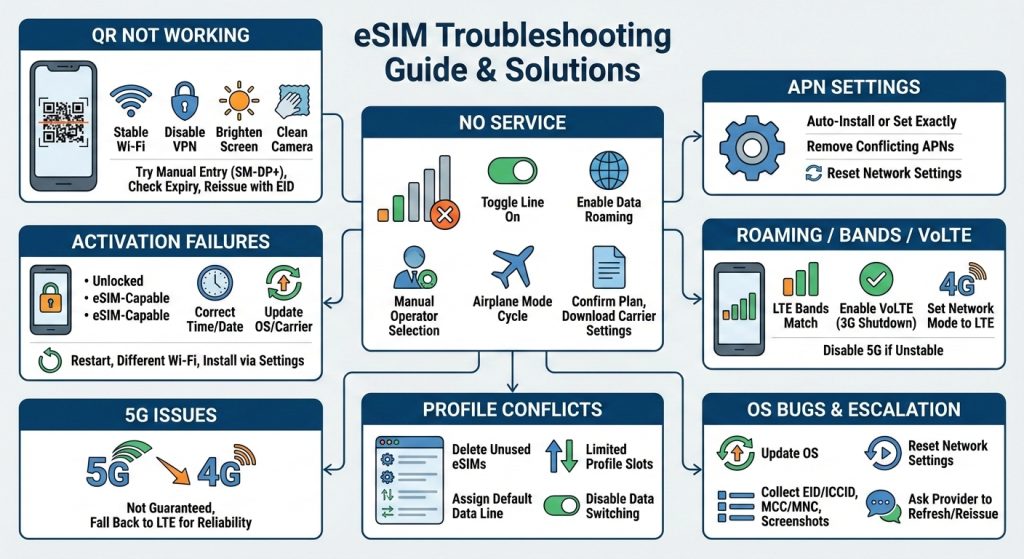
- QR not working: use stable Wi‑Fi, disable VPN, brighten screen, clean camera; try manual entry of SM‑DP+ server and activation code; verify the QR hasn’t expired or been used; if needed, give the provider your EID to reissue the profile.
- Activation failures: ensure the phone is unlocked, eSIM‑capable, and time/date are correct; update OS/carrier settings; restart; try a different Wi‑Fi. Install via Settings > Cellular/Mobile > Add eSIM (iOS) or Network & Internet > SIMs > Add eSIM (Android).
- “No Service”: toggle the line on; enable data roaming; switch to manual operator selection; airplane mode cycle; confirm the plan is active and the country is supported; download carrier settings.
- APN: auto‑install if provided; otherwise set the APN exactly as the provider lists; remove conflicting APNs; reset network settings if edits don’t stick.
- Roaming/bands/VoLTE: confirm local LTE bands match your phone; enable VoLTE—many places have shut down 3G; set network mode to LTE/4G; disable 5G if unstable.
- 5G: not guaranteed on roaming or all plans; fall back to LTE for reliability.
- Profile conflicts/storage: delete unused eSIMs; phones have limited profile slots; assign the correct default data line; disable data switching.
- OS bugs/escalation: update OS, reset network settings; collect EID/ICCID, MCC/MNC, screenshots; ask provider to refresh/unbar or reissue the profile.
11)country and region specifics #
- In the EU, residents on EU plans benefit from Roam‑Like‑At‑Home: calls/SMS/data across EU/EEA at domestic rates, subject to fair‑use; visitors still need travel eSIMs. Post‑Brexit, the UK isn’t covered; many EU carriers reintroduced UK surcharges, and UK carriers vary on EU roaming. China mainland: strict real‑name KYC; local eSIMs are limited and often require in‑person verification; many travel eSIMs route via Hong Kong and may traverse the Great Firewall. India: eSIMs require KYC/Aadhaar with supported operators; tourists typically use physical SIMs or travel eSIM roaming. Turkey: stringent KYC and IMEI registration; unregistered foreign devices may be blocked after short stays—roaming eSIMs avoid registration. United States: LTE/5G in cities; rural coverage varies by carrier; VoLTE required. Japan: 4G/5G, VoLTE essential; some Androids need specific bands/profiles. Middle East: Gulf has networks; some countries restrict VoIP. Africa: urban coverage; choose multi‑network plans. Latin America: city coverage, spotty rural; 4G predominant, selective 5G.
12) special scenarios (cruise ships, remote areas, hotspot) #
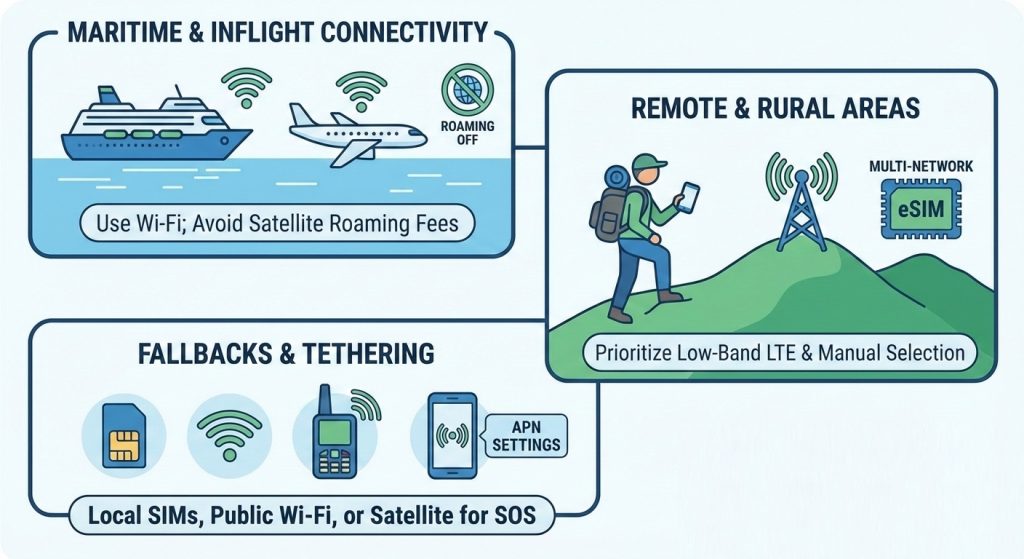
- Maritime and inflight: Ships and planes use onboard cellular (e.g., Cellular at Sea, AeroMobile/OnAir) with satellite backhaul—data is extremely expensive and usually excluded from travel eSIMs. Your phone may roam automatically; keep airplane mode on and use ship/airline Wi‑Fi instead. Messaging‑only Wi‑Fi plans are common; Wi‑Fi Calling may work but isn’t guaranteed.
- Remote/rural: Coverage is sparse; low‑band LTE (Bands 12/13/20/28) and VoLTE support matter more than 5G. Use manual network selection, prefer multi‑network eSIMs, and try moving to higher ground or windows. Download offline maps and eSIM QR/SM‑DP+ details before departure.
- Fallbacks: Buy a local SIM where coverage is better, use public Wi‑Fi, or consider satellite messengers (e.g., inReach) for SOS/texts.
- Hotspot/tethering: Many travel eSIMs allow it, some cap or block. If hotspot fails, set the correct APN (iOS may need carrier settings; Android APN type may include “dun”), then reboot. Note: some MiFi/hotspots don’t support eSIM, and heavy tethering can trigger throttling.
13) FAQs: how do eSIMs work for travel #
- Do eSIMs work internationally, and do I need an unlocked phone? Yes. You need an eSIM‑capable, carrier‑unlocked device and band/VoLTE compatibility for the destination.
- Is eSIM better than a physical SIM for travel, and is it cheaper than roaming? Often yes: instant delivery, keep your home number active, easy switching. Usually cheaper than home‑carrier roaming; local SIM can be cheapest.
- How do I activate an eSIM for travel? Scan the QR, install via the provider’s app, or enter the SM‑DP+ server and activation code manually over Wi‑Fi.
- Can I have multiple eSIMs and switch between countries? Yes, most phones store several profiles; you can enable one at a time and switch in settings.
- Do travel eSIMs include a phone number for calls/SMS? Many are data‑only; some offer add‑on voice/SMS or a local number.
- Does eSIM support 5G, VoLTE, Wi‑Fi Calling? If your phone, plan, and network allow. Roaming may limit you to LTE; VoLTE is often required.
- Can I use eSIM for WhatsApp/iMessage without changing my number? Yes—use data while keeping your existing number for app verification.
- What happens when my travel eSIM plan expires? Data stops; the profile remains. Renew or delete to free space.
- Can I use eSIM on a cruise or in poor coverage areas? Ship/airborne networks are costly and usually excluded; use onboard Wi‑Fi. Remote areas may have limited service.
- Is eSIM safe from SIM‑swap attacks? It helps against physical swaps, but secure your accounts with PINs and 2FA.
3 relevant external links #
- GSMA Remote SIM Provisioning (eSIM architecture and specifications): https://www.gsma.com/solutions-and-services/esim/
- Apple Support: use eSIM on iPhone (setup, activation, and management): https://support.apple.com/en-us/HT209044
- Google Android Help: use eSIM on Android (setup guidance): https://support.google.com/android/answer/10100599


