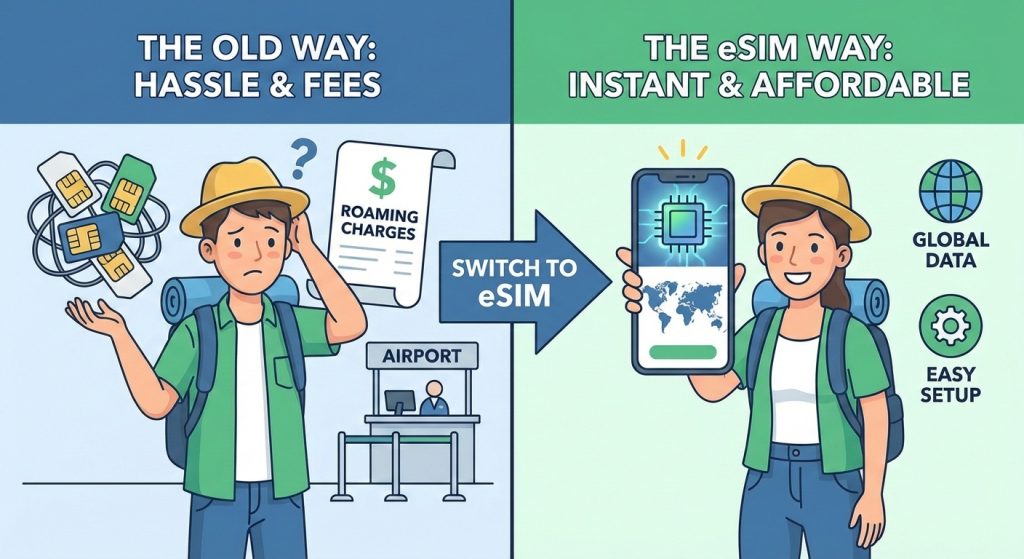
If you’re planning international travel, you’ve probably wondered, how do eSIM cards work for international travel and whether they really make staying connected easier. With roaming bills getting higher and swapping physical SIMs a hassle, eSIM technology is quickly becoming the go-to solution for travelers who want instant, affordable global data without the usual headaches. In this post, you’ll get a clear, straightforward rundown of how eSIMs work, why they’re perfect for overseas trips, and what you need to know to set one up hassle-free. Ready to ditch roaming fees and skip the airport SIM scramble? Let’s dive in.
What Is an eSIM and How Does It Differ from a Physical SIM? #
An eSIM (embedded SIM) is a small, digital SIM built directly into modern devices like smartphones, tablets, and smartwatches. Unlike a traditional physical SIM card that you insert and swap out, an eSIM works by storing your mobile network information electronically. This means no more fumbling with tiny cards or waiting to buy a local SIM when you travel.
Key differences between an eSIM and a physical SIM include:
- No physical card: The eSIM is embedded in your device’s hardware.
- Digital activation: You activate service by scanning a QR code or downloading a profile, no card swap needed.
- Multiple profiles: Manage several network plans on one device, switching easily between carriers or countries.
This innovation marks a significant evolution from traditional SIM cards, offering enhanced security (the SIM can’t be lost or stolen) and greater flexibility for managing your connections. For international travelers, eSIM technology streamlines connectivity, making it easier and cheaper to stay online worldwide without the usual hassles of physical SIM swapping.
Why eSIMs Are Perfect for International Travel #
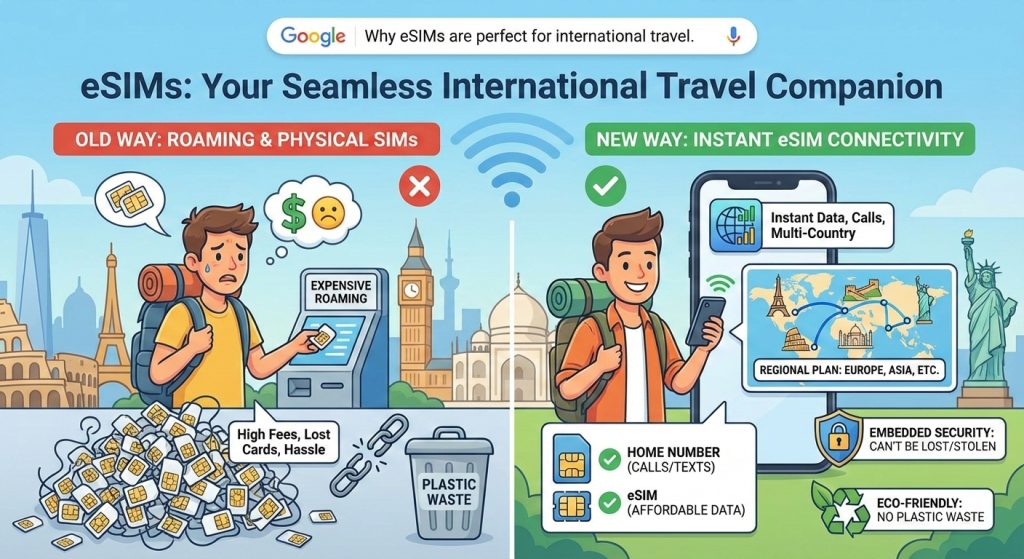
eSIMs are a game-changer for anyone traveling abroad because they help you avoid expensive international roaming charges. Instead of relying on your home carrier’s pricey roaming, you can switch to a local or regional eSIM plan with affordable data and calls.
When you land, there’s no need to hunt for airport SIM cards. With eSIMs, you get instant connectivity upon arrival by activating your plan digitally. This saves time and hassle, letting you get straight to browsing, calling, or using maps.
Many travel eSIMs offer multi-country and regional plans, so you can cross borders without swapping SIMs or losing service. This is perfect if you’re touring Europe, Asia, or multiple countries in one trip.
The dual SIM capability means you can keep your home number active for calls and texts while using the eSIM for data abroad. That’s super handy for staying reachable at home without burning through roaming fees.
Security is another big plus. Since eSIMs are embedded in your device, they can’t be lost or stolen like physical SIM cards, providing peace of mind in crowded or risky environments.
Plus, eSIMs are better for the environment—no plastic cards to waste—and they simplify managing your mobile service while traveling. Convenience and cost savings make eSIMs the perfect companion for international trips.
How eSIMs Work Technically for Travel #
Getting your travel eSIM up and running is pretty simple and fast. Here’s how it usually goes:
Activation Process
- QR Code Scanning: Most providers give you a QR code to scan with your phone. This instantly downloads the eSIM profile.
- App Installation: Some services require their app where you can buy and activate your eSIM plan directly.
- Direct Download: A few carriers let you download and install the eSIM plan right from their website or via phone settings.
Connecting to Local Networks
Once installed, your eSIM connects to local networks automatically or manually, depending on your plan. This makes switching countries smooth without changing SIM cards.
Data-only vs. Full Plans
| Plan Type | Includes | Best For |
|---|---|---|
| Data-only Plans | Mobile data only, good for internet access | Streaming, browsing, navigation |
| Full Plans | Calls, texts, data, and hotspot sharing | Those needing local calls or SMS |
Validity, Top-ups & Network Switching
- Validity Periods: Plans vary from a few days to months—choose what fits your trip length.
- Top-ups: Easily add more data or extend time through apps or websites.
- Automatic Network Switching: eSIMs switch between networks in different countries automatically if supported by your plan, so you stay connected without lifting a finger.
This tech setup is what makes eSIMs ideal for international travel, offering flexibility and easy access to travel data plans eSIM users love.
Device Compatibility and Requirements #
Before you get started with an eSIM for international travel, make sure your device supports it. Here’s a quick look at popular eSIM-compatible phones:
| Brand | Models Supported |
|---|---|
| Apple | iPhone XS, XR, 11, 12, 13, 14+ |
| Samsung Galaxy | S20, S21, S22, S23, Z Fold & Flip |
| Google Pixel | Pixel 3a, 4, 5, 6, 7 |
| Others | Some recent Motorola, Huawei models |
Check if Your Phone Is Unlocked and eSIM-Ready
- Unlocked phone: To use an eSIM abroad, your phone needs to be unlocked (not tied to a single carrier).
- Settings check: On iPhone, go to Settings > Cellular > Add Cellular Plan. If this option shows, your phone supports eSIM.
- On Android, check Settings > Network & Internet > Mobile Network > Advanced > Carrier > Add Carrier or look for eSIM settings.
Tips for Older Devices and Dual SIM Setups
- Older phones without eSIM support still need a physical SIM card.
- Many newer phones support dual SIM: one physical SIM and one eSIM. Use this to keep your home number while using a travel eSIM for data.
- If unsure, contact your carrier or check your device’s manual to confirm eSIM capabilities.
Knowing your device’s compatibility helps avoid hassles and ensures smooth travel eSIM activation when you arrive abroad.
Step-by-Step Guide: Setting Up and Activating an eSIM for Your Trip #
Setting up your travel eSIM is straightforward, but a little planning goes a long way. Here’s how to get it right:
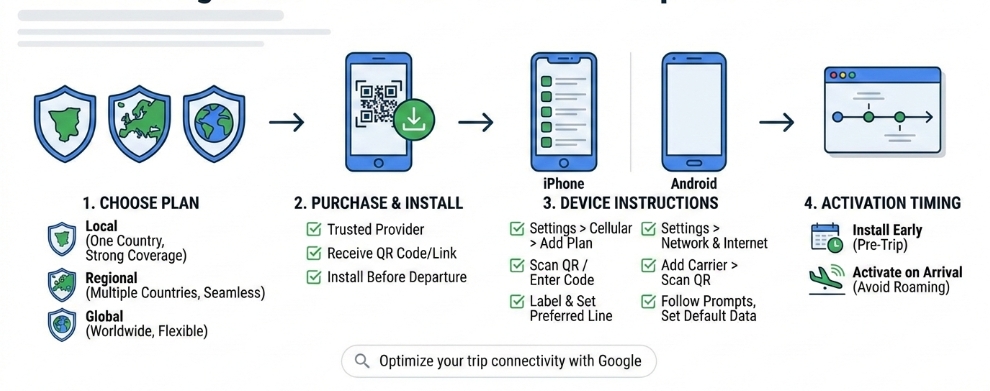
Choosing the Right Plan
- Local plans: Great if you’re staying in one country. Usually cheaper and offer strong local coverage.
- Regional plans: Ideal for trips covering multiple countries in one area. They keep you connected seamlessly across borders.
- Global plans: Best for world travelers needing coverage in many countries with one plan.
Purchasing and Installing Before Departure
- Buy your eSIM from a trusted provider’s website or app.
- You’ll get a QR code or a link for download.
- Installing ahead of time means you can activate the eSIM the moment you land.
iPhone-Specific Instructions
- Go to Settings > Cellular > Add Cellular Plan.
- Scan the QR code or enter the activation code manually.
- Label your eSIM (e.g., “Travel Data”) for easy switching.
- Set your preferred line for data, calls, and SMS.
Android-Specific Instructions
- Open Settings > Network & Internet > Mobile Network > Advanced > Carrier.
- Tap Add carrier, then scan the QR code or enter the activation details.
- Follow on-screen prompts to complete activation.
- Set your default data SIM if using dual SIM functionality.
Activation Timing: Install Early, Activate on Arrival
- Install your eSIM before you travel to avoid last-minute hiccups.
- Activate the plan only once you’ve landed to start using local data and avoid roaming charges.
- Some providers offer automatic network switching for smooth connections.
Troubleshooting Common Issues
If you run into problems like no signal or internet:
- Check if your phone is unlocked and supports the eSIM.
- Make sure mobile data is turned on and the correct SIM profile is active.
- Reset your network settings or restart your phone.
- Update APN (Access Point Name) settings if needed, which your provider will supply.
- Contact customer support for help if issues persist.
Following these steps makes travel eSIM activation smooth and hassle-free—no more waiting in line for SIM cards after landing!
Comparing eSIMs to Alternatives #
When it comes to staying connected abroad, choosing between an eSIM vs. physical local SIM card is a big decision. Physical SIMs require you to buy a new card every time you switch countries, meaning you have to hunt for a local store, deal with new numbers, and swap out cards. With an eSIM for international travel, you get instant activation without changing SIM cards, making it way more convenient.
Compared to home carrier international roaming, eSIMs usually offer much better rates. Roaming fees can be expensive and sometimes unpredictable. Travel eSIM activation often comes with affordable, flexible international data plans eSIM users love, helping avoid roaming charges eSIM users dread. You also get more control over your data usage and can switch plans without calling customer support.
Looking at pocket Wi-Fi or public networks, eSIMs beat them on security and reliability. Pocket Wi-Fi devices need charging, can be bulky, and sometimes have limited coverage. Public Wi-Fi is risky; it’s often unsecured, so using an eSIM connection provides safer and faster internet without the hassle.
Here’s a quick cost snapshot for popular destinations:
| Destination | Physical SIM (Local) | Home Roaming Cost | eSIM Travel Plan |
|---|---|---|---|
| Europe | $20–$40 | $100+ | $10–$30 (regional) |
| Southeast Asia | $10–$20 | $70+ | $15–$25 (country-specific) |
| USA | $30–$50 | $120+ | $20–$40 (global) |
In short, eSIM international travel is often the best balance of cost, convenience, and flexibility compared to the usual alternatives. Whether you’re hopping countries or staying put, it’s a smart way to keep data flowing without the usual roaming pains.
How Much Data Do You Need and How to Choose a Plan #
Figuring out how much data you’ll need on your travel eSIM depends on what you use your phone for. Here’s a quick breakdown of common data uses:
| Activity | Data Used per Hour (Approx.) |
|---|---|
| Browsing & Maps | 150-200 MB |
| Social Media | 250-400 MB |
| Streaming Music | 40-70 MB |
| Streaming Video (SD) | 1 GB |
| Streaming Video (HD) | 3 GB |
| Video Calls | 500 MB – 1.5 GB |
| Emails & Messaging | Minimal (<50 MB) |
Choose the Right eSIM Plan Type
- Fixed Data Plans: Good for short trips or light users; buy a set data amount.
- Unlimited Data Plans: Better if you stream, work remotely, or stay longer.
- Short-term vs. Long-term: Some travel eSIMs offer flexible validity (from a few days to months).
Pick a Plan Based on Your Travel Style
| Traveler Type | Data Use Profile | Plan Recommendation |
|---|---|---|
| Vacationers | Maps, social media, light browsing | Fixed data or short-term unlimited |
| Business Users | Video calls, emails, remote work | Unlimited data with longer validity |
| Digital Nomads | Heavy streaming, multiple devices | Large data packages or global plans |
Why eSIMs Are Flexible and Affordable for Data
- No need to guess too far ahead; many eSIMs let you top up easily.
- Regional eSIM plans can cover multiple countries with one profile.
- You can switch between data-only or full plans (calls + texts + data) depending on your needs.
In short, choosing the right international data plans eSIM means matching your usage with a plan that gives you enough data without overspending. The flexible nature of eSIM travel plans makes this easier than ever.
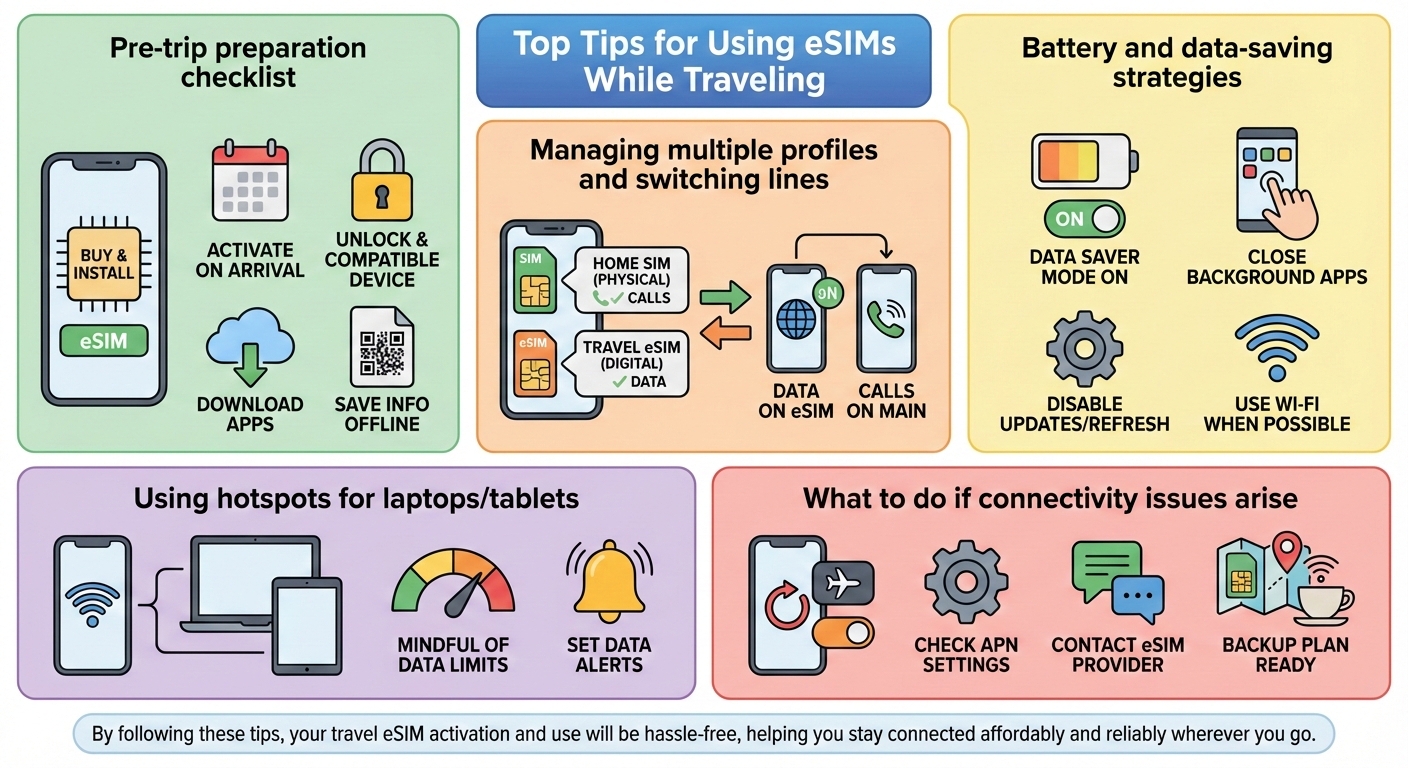
Top Tips for Using eSIMs While Traveling #
Using an eSIM for international travel is super convenient, but a few smart habits can make your trip even smoother. Here’s a quick checklist:
Pre-trip preparation checklist
- Buy and install your travel eSIM before you leave – this saves time upon landing.
- Activate the eSIM right when you arrive to get instant connectivity.
- Check your device compatibility and ensure it’s unlocked and eSIM-ready.
- Download necessary apps from your eSIM provider for easy management.
- Save your eSIM QR codes or activation info offline just in case.
Managing multiple profiles and switching lines
- Keep your home SIM active on a physical slot if you have dual SIM, and use the eSIM for local data.
- Learn how to switch between profiles on your phone’s settings easily.
- Use the eSIM for data-heavy tasks and keep calls/texts on your main number, reducing roaming charges.
Battery and data-saving strategies
- Turn on data saver mode when you’re off Wi-Fi.
- Close apps running background data to extend battery life during long travel days.
- Disable automatic app updates and limit background refresh to save data.
- Use Wi-Fi whenever possible, especially hotel or café hotspots.
Using hotspots for laptops/tablets
- Share your eSIM’s data via mobile hotspot to keep laptops or tablets online.
- Be mindful of your data limits when tethering, especially with limited plans.
- Set data alerts to avoid surprise overages.
What to do if connectivity issues arise
- Restart your phone or toggle airplane mode to reset network connection.
- Double-check your APN settings and update if necessary.
- Contact your eSIM provider’s support through their app or website.
- Have a backup plan ready—like a local physical SIM or cafe Wi-Fi—in case of longer outages.
By following these tips, your travel eSIM activation and use will be hassle-free, helping you stay connected affordably and reliably wherever you go.
Common Myths and FAQs About eSIMs for Travel #
When it comes to eSIM international travel, a few myths and questions pop up a lot. Let’s clear those up so you’re confident using one on your next trip.
Myth 1: eSIMs are slow or unreliable
Not true. eSIM plans use the same local networks as physical SIM cards, so speed and coverage reliability are equal or sometimes better. You’ll get the same 4G or 5G service as locals do, especially with regional eSIM plans tailored for your destination.
Myth 2: You can’t make calls or texts with an eSIM abroad
Most travel eSIM plans offer data-only options, but many also support full plans including calls and texts. Plus, apps like WhatsApp, Skype, or FaceTime let you call over data easily. So yes, you can stay in touch just fine.
FAQ: Can I use WhatsApp or other apps on an eSIM?
Absolutely. Since eSIMs provide regular mobile data, messaging and calling apps work just like on a traditional SIM. Your contacts won’t even notice the difference.
FAQ: What about emergencies?
Emergency calls are always supported regardless of your eSIM status or plan. Just make sure your phone supports emergency dialing in the country you visit, which most modern eSIM-compatible phones do.
FAQ: Can my phone support multiple eSIMs or switch between them?
Yes, many phones allow storing several eSIM profiles and switching them easily. This is perfect for using one for home and another for travel data simultaneously (dual SIM international travel).
Quick tips to avoid issues:
- Install your eSIM before you travel and activate it upon arrival.
- Check if your device is unlocked and eSIM-compatible phones.
- Keep your home SIM active if you want calls or texts from your usual number.
By knowing these facts, you’ll feel ready to choose the best eSIM for abroad with confidence and avoid the hassle of physical SIM swaps or expensive roaming.
Related Sources #
https://www.gsma.com/solutions-and-impact/technologies/esim
https://support.apple.com/en-us/101559
https://support.google.com/pixelphone/answer/9449293
https://www.samsung.com/us/support/answer/ANS00088152
https://www.pcmag.com/explainers/what-is-an-esim
https://www.cnet.com/tech/mobile/esim-vs-physical-sim-cards-everything-you-need-to-know
https://www.tomsguide.com/features/what-is-an-esim-everything-you-need-to-know
https://thepointsguy.com/guide/esim-for-international-travel
https://www.forbes.com/advisor/travel-rewards/what-is-an-esim-for-travel
https://www.cnn.com/cnn-underscored/travel/best-esim-for-international-travel
https://thriftytraveler.com/guides/international-travel/esim-for-international-travel


